Saturday, June 6, 2026
Production ready Polaris
Friday, May 15, 2026
Polaris and Cloud tokens
- the token only allowing access to a single directory and its subfolders, not the whole bucket
- the token is no good after X minutes (where the default valu of X is 60)
Monday, April 20, 2026
Cloud Topologies and Azure
- a VPN (virtual private network) that is an entirely isolated environment
- subnets that are divided into public and private IP spaces by using non-overlapping CIDR blocks
- an internet gateway that allows access to the outside world and performs the NAT
- Route tables that permit traffic flows by typically bringing together subnets and security groups. If subnets are rooms in a building, route tables are the corridors between them and the Network ACLs (NACLs) are the bouncers on the door. Security groups are more identity based and they do a similar job to NACLs albeit at the vNIC level.
- a load balancer that allows incoming traffic from the internet. This differs from the load balancer as it's more the receptionist directing people rather than the security guard on the front door.
- the computers/VMs on which Kubernetes runs, called nodes.
- Create the Resource Group
- Create an identity for this group.
- Create a network for this group and identity.
- Create the Virtual Network compatible with the resource group
- Create the subnet for the Virtual Network
- Create a Network Security Group for the resource group. This defines the inbound and outbound rules. Funnily enough, the rules in the NSG are of higher priority the lower the number.
- We associate the subnet with the Network Security Group
- We assign a role to the subnet.
- Assign the subnet to a K8s Node Pool
- Create a network profile
Friday, March 20, 2026
Multi-cloud Devops tips
Friday, March 6, 2026
Permissions and Lakes
"It allows clients to verify the identity of the end user based on the authentication performed by an authorization server, as well as to obtain basic profile information about the end user in an interoperable and RESTlike manner." Zero Trust Networks (O'Reilly)
"Uploading and managing TLS secrets can be difficult. In addition, certificates can often come at a significant cost. To help solve this problem, there is a nonprofit called “Let’s Encrypt” running a free Certificate Authority that is API-driven. Since it is API-driven, it is possible to set up a Kubernetes cluster that automatically fetches and installs TLS certificates for you. It can be tricky to set up, but when working, it’s very simple to use. The missing piece is an open source project called cert-manager created by Jetstack, a UK startup, onboarded to the CNCF." - Kubernetes Up & Running 3rd Ed., O'Reilly
Cloud and K8s
- we bought a domain name from AWS via Route53.
- we delegated the nameservers of this domain to Microsoft or Google.
- a Kubernetes sidecar starts up and contacts Let's Encrypt's API .
- Let's encrypt returns a token
- the sidecar encodes with its private key and hosts it (a.k.a Key Authorization) on port 80.
- Let's encrypt reads that file and decodes it with the cluster's public key. Now it can grant a certificate.
- network security groups (or lack of them)
- misconfigured ports
- selectors not pointing at the correct pods
- ingress (optional - see above)
- service
- endpoint
- pod
Thursday, February 19, 2026
An unruly Terraform
PhillHenryI'm using Terraform to manage my AWS stack that (amongst other things) creates a load balancer using an aws-load-balancer-controller. I'm finding destroying the stack just hangs then times out after 20 minutes.I've had to introduce bash scripts that patch finalizers in services and installations plus force delete CRDs. Finally, tofu detroy cleans everything up but I can't help feeling I'm doing it all wrong by having to add hacks.Is this normal? If not, can somebody point me in the right direction over what I'm doing wrong?
snuufixIt is normal with buggy providers, it's just sad that even AWS is one.
The_Ketchup, CJOThis is mainly for my homelab to teardown when Im done for the day. So when the aws ingress controller makes an LB via K8s, terraform doesnt know about it so I have to manually go in and delete it in the aws console. Its not very clean. So I was thinking maybe if its managed under argocd it will know about it and delete it? Idk its kinda confusing. Maybe I jsut do kubectl delete ingress --all or something and THEN do terraform destroy?Cuz right now it just wont delete my subnets since theres an LB in there when I do terraform destroyDarkwind The Dark DuckU could use AWS Nuke to clean anything remaining 😄
Saturday, November 15, 2025
Debugging Google Cloud Kubernetes
- CREATE_CLUSTER began at 16:35:38 and ran to 16:41:37
- DELETE_NODE_POOL started at 16:41:41 and ran to 16:46:02
Monday, August 25, 2025
Cloud Architecture
- must be secure
- must be entirely FOSS based
- must be cross-cloud
- allows a bring-your-own policy
Tuesday, August 16, 2022
More AWS/GitHub notes
If you don't fancy hand-crafting YAML to set up your AWS infrastructure, Amazon offers the Cloud Development Kit.
They've taken an interesting architectural decision. They've written the logic in JavaScript executed via node. But to make it a polyglot kit, they've added what are essentially bindings that run the node executable. I guess this makes the logic less likely to diverge between languages but it also means more hassle setting up your environment.
What it means is that the Java (or the supported language of your choice) does not talk to the AWS cloud directly. It generates files that you must then feed to cdk. This is different to Fabric8's Kubernetes client or the docker-java library, both of which allow you to control the containerization in the JVM with no further tooling required.
[Aside: Terraform have a similar toolkit to CDK here but I gave up due to the lack of documentation].
CDK set up
AWS's Java CDK binding needs node in the PATH environment variable. Note, IntelliJ doesn't seem to put it into the PATH by default and I was getting the unhelpful "SyntaxError: Unexpected token ?" - a very unintuitive message. It appears that the Java implementation executes this node command using ProcessBuilder (see JsiiRuntime.startRuntimeIfNeeded) .
You install the node runtime with
npm install -g aws-cdk
You can initialize a Java project with:
cdk init app --language java
You then write your Java code to describe your environment using the libraries pulled in by the generated pom.xml. Knowing exactly what to do can be hard so you might want to look at some example on GitHub here.
When you're done, run your Java code. Then you can call cdk synth to generate the metadata and cdk deploy to deploy it and as if by magic, your S3 bucket etc is deployed in AWS! Note you must run this in the top-level directory of your Java project. Apparently, state is saved and shared between the Java build and the call to cdk.
All an act
You can run GitHub actions locally with act. This really helps with debugging.
If you're .github YAML looks like this:
jobs:
code:
Then run Act with something this:
act -n --env-file .github/pr.yml -j code -s AWS_ACCESS_KEY_ID=$AWS_ACCESS_KEY_ID -s AWS_SECRET_ACCESS_KEY=$AWS_SECRET_ACCESS_KEY
where the -j means which YAML block you're running.
Remove the -n if you want it to be a real run rather than a dummy run.
If you want to use secrets, you can just set them as environment variables. For instance:
env:
AWS_ACCESS_KEY: ${{ secrets.AWS_ACCESS_KEY_ID }}
run: /root/.local/bin/poetry run python -m pytest integration_tests
will use your system's environment variable AWS_ACCESS_KEY_ID as the value of AWS_ACCESS_KEY that the integration tests use.
Tuesday, July 19, 2022
Docker, ECS and access
AWS now offers the ability to remotely login to Docker containers running in ECS. The secret sauce in the Terraform script was to point execution_role_arn under the
resource "aws_ecs_task_definition" "compute_task"
to the ARN of an aws_iam_role that has the right policy. A really good guide is here. However, I still had a few issues.
First, you need to install session-manager-plugin. I followed all the instructions to install it on Ubuntu here and it seemed to install without error. But, when I ran:
$ aws ecs execute-command --cluster CLUSTER_NAME --task TASK_ARN --container CONTAINER --interactive --command "/bin/bash"
SessionManagerPlugin is not found. Please refer to SessionManager Documentation here: http://docs.aws.amazon.com/console/systems-manager/session-manager-plugin-not-found
Which was odd as it evidently was installed:
henryp@adele:~$ session-manager-plugin
The Session Manager plugin was installed successfully. Use the AWS CLI to start a session.
Interestingly, the excellent IntelliJ AWS plugin could connect but I noticed that it used it's own session-manager-plugin even though it claimed to be exactly the same version.
So, I created a Docker image to run on my local machine that thas the session-manager-plugin installed. Amazon does not appear to offer this so I needed to build my own. I had a file called AwsDocker/Dockerfile that had this:
FROM amazon/aws-cli
RUN curl "https://s3.amazonaws.com/session-manager-downloads/plugin/latest/linux_64bit/session-manager-plugin.rpm" -o "session-manager-plugin.rpm" && \
yum install -y ./session-manager-plugin.rpm
docker build --no-cache -t my_aws AwsDocker/
and run with:
docker run -v $HOME/.aws/credentials:/root/.aws/credentials:ro -t -i my_aws --debug --region eu-west-2 ecs execute-command --cluster CLUSTER_NAME --task TASK_ARN --interactive --command "/bin/bash"
And lo! I manage to login. (You can lose the --debug if you want as it's verbose but it does help sometimes).
Note that there are many ways [SO] to add the credentials to the local Docker image and the one I chose from the SO answer is a bit broken. The line above fixes it.
Monday, November 9, 2020
Cache in the Azure
Gotcha!
What surprised me with the Azure/DataBricks/Spark architecture was a lack of cache coherence. Data is pulled from Azure's Gen2 and is stored closer to the Spark executors upon calling cache(). However, if another cluster updates that data, don't expect the first cluster to see it.
In my case, I was using DataBrick's Delta format to overwrite data as outlined here in the Delta Lake docs. But first, a business requirement demanded that if we're overwriting anything, an override flag must be set. However, because of a lack of cache coherence, this check indicated that there was nothing to overwrite even if another cluster had written that partition. This caused my code to overwrite what was there irrespective of the flag! This significantly changes the semantics of my Big Data application.
Furthermore, any writes after cache() has been called are not reflected in the original Gen2 storage in Azure...
"The Delta cache automatically detects when data files are created or deleted and updates its content accordingly. You can write, modify, and delete table data with no need to explicitly invalidate cached data." [DataBricks Delta Cache docs] This doesn't appear to be the case, at least if it's referring to the original file(s).
"Multiple writers across multiple clusters can simultaneously modify a table partition and see a consistent snapshot view of the table and there will be a serial order for these writes" [DataBrick Delta docs] Again, this might be true but not after cache() has been called, it appears.
The only interesting piece of architecture is that the Azure Gen2 storage was mounted using:
dbutils.fs.mount(
source = s"wasbs://${dst}@${account}.blob.core.windows.net/",
mountPoint = x,
extraConfigs = Map(s"fs.azure.account.key.$account.blob.core.windows.net" -> dbutils.secrets.get(scope = "discope", key = key))
Investigation continue but a friend at a completely different company that uses Databricks confirmed it's not me to whom this is happening. He too tried to replace a partition with a .option("replaceWhere=...") and although it appeared to work "locally" it did not change the underlying file store changed the underlying data store but the problem is upon further reading. The Delta log has been cached also and is now stale. You need to run spark.catalog.clearCache and then reads are OK.
Friday, October 23, 2020
Optimizing Spark/DataBricks in Azure
We have about 1.5TB of parquet data in Gen 2 storage on Azure and we're trying to read it with a DataBricks cluster of 8 nodes each with 56gb and 16 cores. All I'm trying to do is some basic select('aColumn).distinct and where('anotherColumn < X).count()s.
Surprisingly, this is running like a dog: the first query takes about 50 minutes and the second about 18. Tuning is an empirical science but this felt wrong as 1.5TB of data is not that much these days.
![]() |
| Ganglia Metrics |
![]() |
| Spark GC logs |
![]() |
| Storage Tab |
Compare this to the storage tab when we're not using Delta Cache and you'll see there won't be any data in the "Parquet IO Cache". (Note that the page says "RDDs" when we're only using the Dataset API. This is standard). Anyway, enabling Delta Cache seemed to make no difference at all.
Using a "Delta Cache Accelerated" cluster actually made the initial distinct.count() take much longer (1.47 hours) with only marginally reduced time for the next query (16.8 minutes).
Disk is incredibly slow compared to memory. Ultimately, I was trying to process too much data with too little RAM and there's only so far tuning will get you before your metrics plateau. So, I made a cluster of 25 nodes each with 28gb of RAM and 8 cores. This did help but not as much as I was expecting. The distinct.count() now took 38 minutes and the where(...).count() 12 minutes. This is between a 25%-33% improvement but still seems a long time in absolute terms.
I want my Data Locality
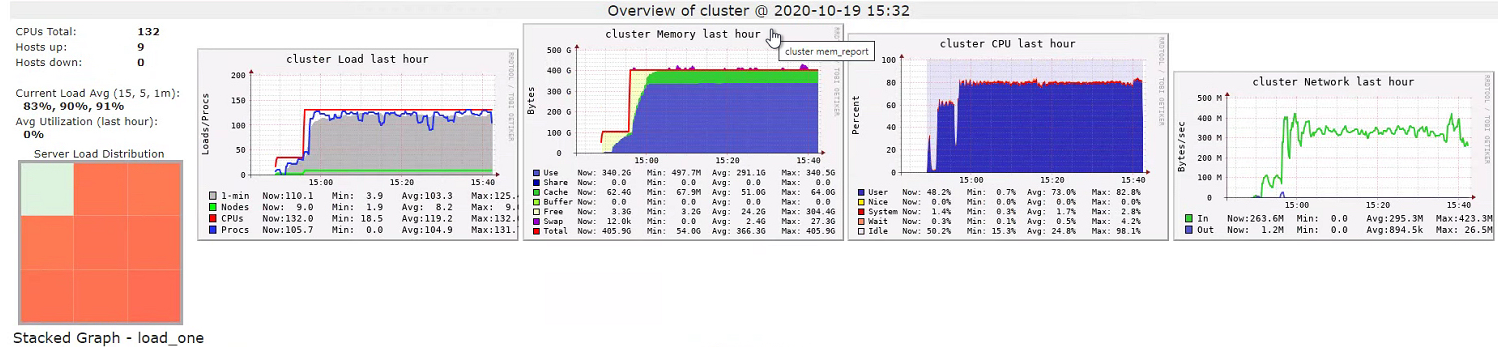
The problem appears to be that all the data is pulled to the executors even if we're only interested in just one column [see StackOverflow]. Evidence for this came from another look at Ganglia:
![]() |
| Ganglia Metrics during second query |
"In Azure really fast networks compensate for having data and compute separated." [ibid] Indeed, the threads seemed to spend all their time on the first call in code to parse the Parquet rather than blocking on IO. But you can't get over the fact that my two queries are doing much the same thing (no joins) but the first takes three times longer than the second. To demonstrate, instead of two different queries, I ran the distinct.count() query twice. The first time took 42 minutes, the second 15. So, it appears that pulling 1.5TB of data from Gen2 into Spark takes about 25 minutes.
Azure is not the only cloud offering that implements this architectural trick. GCP takes all the data out of storage and puts it into an ephemeral HDFS cluster.
Solution
A new day, a new dawn. Let's start the cluster again and go from the beginning. This time, I won't explicitly enable IO cache and I won't even call .cache() on my DataFrame. To my amazement, the same query ran in about 30 seconds today! It seemed that this .cache() call was the root of my problems as re-introducing it returned us to a 50 minute wait. This is pretty much the opposite of what you'd expect with an on-prem Hadoop/YARN cluster.
Thursday, August 27, 2020
Azure
The Azure web GUI is quite immature. For instance, if you install the Azure Storage Explorer (Windows only) it doesn't show timestamps of files. Fortunately, a lot (everything?) can be done from the command line. This, for instance, mounts a SMB drive in the cloud on my local Linux box where it can be treated as any other directory:
sudo mount -t cifs //XXX.file.core.windows.net/DIRECTORY /mnt/DIRECTORY -o vers=3.0,username=USERNAME,password=GET_THIS_FROM_THE_WEB_GUI,dir_mode=0777,file_mode=0777,serverino
Also, if you want to put a multi-line value into Microsoft's Key Vault, you'll find you can't do it in the web GUI. You need to put the text with line returns into YOUR_FILE and use:
az keyvault secret set --name YOUR_KEY --vault-name VAULT_NAME --value "`cat YOUR_FILE`"
Docker and K8s in the Azure cloud
First, tag your image with something like:
docker tag 8d2be7e5d4eb XXX.azurecr.io/YYY:1.0
where XXX is your image repository subdomain in Azure and YYY is the name of the artifact. Login with:
az acr login -n XXX
and now you can push your artifact into the Azure infrastructure:
docker push XXX.azurecr.io/YYY
(You might need to run az acr login -n XXX first)
Let's check it works:
kubectl run -i --tty --attach ARBITRARY_NAME --image=XXX.azurecr.io/YYY:1.0 --command -- /bin/bash
and behold, we are on the CLI of a remote container in the Azure cloud.
But don't forget to clean up after ourselves with:
kubectl delete deployment ARBITRARY_NAME
Network Speeds
By having your image pushed to K8s, you can run your code in Azure as easily as your laptop. The big benefit is network speeds. In my case, I was decrypting an RSA encoded file taken from BLOB storage at about 1mb/s on my (well specced) laptop but exactly the same code was easily managing 10mb/s in the Azure cloud. (Yes, I know that using asymmetric ciphers for large files is not efficient [SO] but this was imposed on us by our client). By using jstack, I could see that the threads on my laptop were spending most of their time in IO not Bouncy Castle.
Tuesday, March 3, 2020
Azure, Docker and K8s
I'm trying to get Spark to work on Azure in a Kubernetes container. With Azure, you provision some boxes that have K8s running on them but it's the provisioned boxes you pay for irrespective of the containers running (or not) in Kubernetes.
This gives us greater control over what is deployed and when. However, talking to Azure storage has not been easy.
Talking to Azure Storage with Java drivers
First, I want to use the latest image of Spark. At the time of writing, this is v3.0.0-preview2 but I couldn't find a Docker image for it so I built my own.
$ git checkout v3.0.0-preview2
$ mvn clean install -DskipTests
I then build a Docker image using Spark's ./bin/docker-image-tool.sh and publish it to my Docker hub account. With some K8s config that looks a little like this, I can start up a Spark cluster. In the Spark REPL, I run some fairly hacky code to give me access to Azure:
val accountName = ???
val accountKey = ???
val container = ???
val confKey = s"fs.azure.account.key.$accountName"
val confKey2 = s"$confKey.blob.core.windows.net"
val confKey3 = s"$confKey.dfs.core.windows.net"
val confKey4 = s"$confKey.file.core.windows.net"
val sas = ???
spark.conf.set( s"fs.azure.sas.$container.$accountName.dfs.core.windows.net", sas)
spark.conf.set( s"fs.azure.sas.$container.$accountName.file.core.windows.net", sas)
sc.hadoopConfiguration.set( s"fs.azure.sas.$container.$accountName.dfs.core.windows.net", sas)
sc.hadoopConfiguration.set( s"fs.azure.sas.$container.$accountName.file.core.windows.net", sas)
spark.conf.set( confKey, accountKey)
spark.conf.set( confKey2, accountKey)
spark.conf.set( confKey3, accountKey)
spark.conf.set( confKey4, accountKey)
val clazz = "org.apache.hadoop.fs.azure.NativeAzureFileSystem"
sc.hadoopConfiguration.set("fs.abfs.impl", clazz)
sc.hadoopConfiguration.set("fs.abfss.impl", clazz)
sc.hadoopConfiguration.set("fs.azure", clazz)
sc.hadoopConfiguration.set("fs.wasbs.impl", clazz)
sc.hadoopConfiguration.set("fs.wasb.impl", clazz)
sc.hadoopConfiguration.set(confKey, accountKey)
sc.hadoopConfiguration.set(confKey2, accountKey)
sc.hadoopConfiguration.set(confKey3, accountKey)
sc.hadoopConfiguration.set(confKey4, accountKey)
You can get the credentials you need by running:
$ az storage account keys list -n ACCOUNT_NAME -g GROUP --subscription YOUR_AZURE_SUBSCRIPTION
and the SAS (Shared Access Signature) from the Azure web console (you may need to allow HTTP). Without the SAS, you may get what is probably the most uninformative error message I have ever seen:
Value for one of the query parameters specified in the request URI is invalid.
Which parameter and why is it invalid? This originates on the server side so there is no chance to debug it.
Anyway, when I tried to read from an Azure File System using something like this:
I saw a stack trace puked with:
... Caused by: com.microsoft.azure.storage.StorageException: The specified Rest Version is Unsupported.
Sniffing the network traffic with:
$ tcpdump -A -nn host MY_BOX_IP and MICROSOFTS_API_IP_ADDRESS -i eth0
Was showing:
14:45:32.445119 IP MY_BOX_IP.59274 > MICROSOFTS_API_IP_ADDRESS.80: Flags [P.], seq 1:603, ack 1, win 502, options [nop,nop,TS val 1401020617 ecr 1846141065], length 602: HTTP: HEAD ...
...
Accept: application/xml
Accept-Charset: UTF-8
Content-Type:
x-ms-version: 2014-02-14
User-Agent: Azure-Storage/2.0.0 (JavaJRE 1.8.0_242; Linux 4.15.0-1066-azure)
x-ms-client-request-id: dfd4qall-6657-45f7-9ed5-00e455e95bee
Host: MY_BOX.dfs.core.windows.net
Connection: keep-alive
OK, so let's rebuild Spark with this:
mvn clean install -DskipTests -Phadoop-3.2
The hadoop-3.2 profile gives me a dependency on, you guessed it, a later version of Hadoop that provides the transitive dependency of azure-storage 7.0.0 that dates to February 2018.
I push this to my Docker Hub account with:
don't forget to tag it (SO) and deploy my cluster on Kubernetes as before.
But this too appears to be an old client as running against Azure Storage results in the same exception despite tcpdump now showing the relevant HTTP header as:
x-ms-version: 2017-07-29
Some crumb of comfort is that I can read the file if I use a slightly different URL.
val df = spark.read.parquet(s"wasb://landing@$accountName.blob.core.windows.net/MY_PARQUET")
However, any writing results in:
com.microsoft.azure.storage.StorageException: This operation is not permitted on a non-empty directory.
even when the directory is not empty at all.
Another soupcon of good news is that at least I can read and write from and to Azure Blob Containers:
val df = spark.read.text(s"wasbs://$container@$accountName.blob.core.windows.net/MY_PARQUET")
This works.
What's the version number, Kenneth?
In desperation, I forced Spark to use a more recent version by running Spark with:
--packages org.apache.hadoop:hadoop-azure:3.2.0,com.microsoft.azure:azure-storage:8.6.0
And sure enough, tcpdump shows:
x-ms-version: 2019-02-02
This seems to pass the x-ms-version check but then results in:
Incorrect Blob type, please use the correct Blob type to access a blob on the server. Expected BLOCK_BLOB, actual UNSPECIFIED.
which (I'm guessing) is due to incompatibility due to azure-storage not being the version hadoop-azure is expecting.
I've left a message on the Hadoop users' mailing list asking for help as I still want to talk to the Azure File System rather than a Blob Container.
Hacky workaround
To get a Linux Azure instance that can mount Gen 2 storage, check out this GitHub repository.
I changed the kubernetes-volume-drivers/flexvolume/blobfuse/deployment/Dockerfile so:
FROM ubuntu:18.04
$ git diff
...
-FROM openjdk:8-jdk-slim
+FROM ph1ll1phenry/blobfuse-openjdk-8-jdk-slim
Note that you will have had to apply the secret in K8s that looks something like this:
apiVersion: apps/v1
kind: Secret
metadata:
name: storage-secret
namespace: blogdemodeployments
type: Opaque
data:
azurestorageaccountname: ???
azurestorageaccountkey: ???
where the credentials are as we used for Spark's REPL.
The Solution
This came from our friendly Azure sysadmin. Basically, it's to use OAuth, so:
spark.conf.set("fs.azure.account.auth.type", "OAuth")
spark.conf.set("fs.azure.account.oauth2.client.secret", SECRET)
spark.conf.set("fs.azure.account.oauth2.client.id" , APP_ID)
spark.conf.set("fs.azure.createRemoteFileSystemDuringInitialization", "true")
spark.conf.set("fs.azure.account.oauth.provider.type", "org.apache.hadoop.fs.azurebfs.oauth2.ClientCredsTokenProvider")
spark.conf.set("fs.azure.account.oauth2.client.endpoint", "https://login.microsoftonline.com/" + TENANT + "/oauth2/token")
spark.conf.set("fs.azure.account.auth.type." + accountName + ".dfs.core.windows.net", "SharedKey")
spark.conf.set("fs.azure.account.key." + accountName + ".dfs.core.windows.net", accountKey)
- The tenant is the ID of our active directory in Azure
- The app id (also known as client id) is the ID of the service principal
- The secret is something you create under the service principal which you use to authenticate (i.e. a password)