Showing posts with label Azure. Show all posts

Monday, April 20, 2026

Cloud Topologies and Azure

All clouds follow a similar pattern when it comes to networking. All of them have:
  • a VPN (virtual private network) that is an entirely isolated environment
  • subnets that are divided into public and private IP spaces by using non-overlapping CIDR blocks
  • an internet gateway that allows access to the outside world and performs the NAT
  • Route tables that permit traffic flows by typically bringing together subnets and security groups. If subnets are rooms in a building, route tables are the corridors between them and the Network ACLs (NACLs) are the bouncers on the door. Security groups are more identity based and they do a similar job to NACLs albeit at the vNIC level.
  • a load balancer that allows incoming traffic from the internet. This differs from the load balancer as it's more the receptionist directing people rather than the security guard on the front door.
  • the computers/VMs on which Kubernetes runs, called nodes.
The terminology may slightly differ but this is true for all the main cloud providers

Azure

Now, bearing in mind that this is the general concept for all cloud/K8s clusters, the recipe in Azure is:
  1. Create the Resource Group
  2. Create an identity for this group.
  3. Create a network for this group and identity.
Now, when it comes to the network, the steps are:
  1. Create the Virtual Network compatible with the resource group
  2. Create the subnet for the Virtual Network
  3. Create a Network Security Group for the resource group. This defines the inbound and outbound rules. Funnily enough, the rules in the NSG are of higher priority the lower the number.
  4. We associate the subnet with the Network Security Group
  5. We assign a role to the subnet.
Now we can set up the Kubernetes cluster if we:
  1. Assign the subnet to a K8s Node Pool
  2. Create a network profile
This last one is interesting. It's the "the reference to the network interface card" [Azure for Architects, Packt]. The network car is the actual physical hardware the packets must use but generally they're only referenced in Azure (and GCP) as virtual network interface cards (vNIC). In AWS, they're called ENIs.

Wednesday, September 17, 2025

Configuring Polaris for Azure


Azure Config

To dispense tokens, you need to register what Azure calls an app. You do this with:

az ad app create \
  --display-name "MyMultiTenantApp" \
  --sign-in-audience "AzureADMultipleOrgs"

The sign-in-audience is an enum that determines if we're allowing single- or multi-tenant access (plus some Microsoft specific accounts).

Create the service principle with:

az ad sp create --id <appId>

where <appId> was spat out by the create command.

Finally, you need to assign roles to the app:

az role assignment create  --assignee <appId>  --role "Storage Blob Data Contributor" --scope /subscriptions/YOUR_SUBSCRIPTION/resourceGroups/YOUR_RESOURCE_GROUP

One last thing: you might need the credentials for this app so you can pass them to Polaris. You can do this with:

az ad app credential reset --id <appId>

and it will tell you the password. This is AZURE_CLIENT_SECRET (see below).

Polaris

First, Polaris needs these environment variables set to access Azure:

AZURE_TENANT_ID
AZURE_CLIENT_ID
AZURE_CLIENT_SECRET

Note that these are the credentials of the user connecting to Azure and not those of the principal that will dispense tokens. That is, they're your app's credentials not your personal ones.

Configuring the Catalog

The values perculiar to Azure that you need to add to the storageConfigInfo that is common to all cloud providers. These are:
  • tenantId. You can find this by running az account show --query tenantId.
  • multiTenantAppName. This is the Application (client) ID that was generated when the app was created. You can see it in Microsoft Entra ID -> App Registrations -> All Applications in the Azure portal or using the CLI: az ad app list, find your app with the name you created above and use its appId.
  • consentUrl. I'm not entirely sure what this is but can be generated with APPID=$(az ad app list --display-name "MyMultiTenantApp" --query "[0].appId" -o tsv) && echo "https://login.microsoftonline.com/common/oauth2/v2.0/authorize?client_id=$APPID&response_type=code&redirect_uri=http://localhost:3000/redirect&response_mode=query&scope=https://graph.microsoft.com/.default&state=12345"
Find out which url to use:

$ az storage account show --name odinconsultants --resource-group my_resource --query "{kind:kind, isHnsEnabled:isHnsEnabled}" -o table
Kind       IsHnsEnabled
---------  --------------
StorageV2  True

HNS stands for hierarchical nested structure.
For StorageV2 and HNS equal to True, use abfss in the allowedLocations part of the JSON sent to /api/management/v1/catalogs.

Testing the credentials

Check the validity of the SAS token with:

az storage blob list  --account-name odinconsultants  --container-name myblob --sas-token $SAS_TOKEN --output table

We get SAS_TOKEN by putting a break point in Iceberg's ADLSOutputStream constructor.

Iceberg bug?

Iceberg asserts that the key in the map of Azure properties sent by Polaris for the expiry time is the string is adls.sas-token-expires-at-ms.PROJECT_NAME. But Polaris is emitting the string expiration-time. I've raised a bug in the Iceberg project here (14069).

I also raised a concurrency bug here (14070) but closed it when I realised it had been fixed in the main branch even if it wasn't in the latest (1.9.2) release.

Anyway, the upshot is that my workaround is to mask the Iceberg code by putting this (almost identical) class first in my classpath.

Wednesday, January 29, 2025

Databricks in an ADF pipeline

ADF is a nasty but ubiquitous techology in the Azure space. It's low-code and that means a maintenance nightmare. What's more, if you try to do anything remotely clever, you'll quickly hit a brick wall.

Fortunately, you can make calls from ADF to Databricks notebooks where you can write code. In our case, this was to grab the indexing SQL from SQL Server and version control it in Git. At time of writing, there was no Activity in ADF to access Git.

To access Git you need a credential. You don't want to hardcode it into notebook as anybody who has access to it can see it. So, you store it as a secret with something like:

echo GIT_CREDENTIAL | databricks secrets put-secret YOUR_SCOPE YOUR_KEY
databricks secrets put-acl YOUR_SCOPE YOUR_USER READ

where YOUR_SCOPE is the namespace in which the secret lives (can be anything modulo some reserved strings); YOUR_KEY is the key for retrieval and YOUR_USER is the user onto whom you wish to bestow access.

Now, your notebook can retrieve this information with:

git_credential = dbutils.secrets.get(scope="YOUR_SCOPE", key="YOUR_KEY")

and although others might see this code, the value is only accessible at runtime and only when YOUR_USER is running it.

Next, we want to get an argument that is passed to the Databricks notebook from ADF. You can do this in Python with:

dbutils.widgets.text(MY_KEY, "")
parameter = dbutils.widgets.get(MY_KEY)

where MY_KEY is a base parameter in the calling ADF Notebook Activity, for example:

Passing arguments to a Databricks notebook from ADF

Finally, you pass a return value back to ADF with:

dbutils.notebook.exit(YOUR_RETURN_VALUE)

and use it back in the ADF workflow by referencing @activity("YOUR_NOTEBOOK_ACTIVITY_NAME").output.runOutput in this case where we want to run the SQL the notebook returned:

ADF using the value returned from the Databricks notebook

That's how ADF talks to Databricks and how Databricks replies. There's still the small matter of how the notebook invokes Git.

This proved unexpectedly complicated. To check the code out was easy:

import subprocess
print(subprocess.run(["git", "clone", f"https://NHSXEI:{git_credential.strip()}@dev.azure.com/YOUR_GIT_URL/{repo_name}"], capture_output=True))

but to run some arbitrary shell commands in that directory via Python was complicated as I could not cd into this new directory. This is because cd is a built-in [SO] of the shell not an executable. So, instead I used a hack: my Python wrote some dynamically generated shell script, wrote it to a file and executed it from a static piece of shell script. Bit ick but does the job.

Monday, January 20, 2025

Azure real estate

Azure Data Factory

Think Airflow moving data around and has connectors to enable ingest/egress. This graphic oozes details.
"The main engine that is responsible for the running of Data Factory is called the integration runtime." [3]

Azure Pipelines

CI/CD in the Azure world. 

External Tables

Rather than a bulk insert, Azure SQL can point to a blob store and use the data there as if it were a DB table. Which strategy you use when the underlying blob storage is update appears to be configurable. You do this with something like "CREATE EXTERNAL TABLE ... WITH (LOCATION = ... " 

"This specifies where Synapse [see below] should load the data files (CSV files) from, and the column delimiters used in the CSV." [1]

This appears to be only available on Azure SQL not SQL Server 2016 according to this SO (nor 2022 if my Docker container is anything to go by). Apparently, PolyBase [SO] is needed.  

The big downsides of external tables include lack of indexes, referential integrity and performance.

PolyBase

"PolyBase enables your SQL Server instance to query data with T-SQL directly from SQL Server, Oracle, Teradata, MongoDB, Hadoop clusters, Cosmos DB, and S3-compatible object storage without separately installing client connection software" [Microsoft] This " is to allow the data to stay in its original location and format"

Synapse
"Azure Synapse Analytics enables you to use SQL and Spark technologies to analyze big data, offers a Data Explorer for log and time series data analytics, and can persist data in its native data warehouse." [1]
"Azure Synapse provides more analytic storage."[2]
"Synapse prefers an ELT (extract, load, transform) process for data ingestion over an ETL (extract, transform, load) process... the process basically moves data into Synapse and “loads” the data before the transforms happen." [2]

Think of Synapse as Azure's Hive.

Managed Instances

"Because of work seamlessly. its design, Azure SQL Managed Instance provides many more features that provide parity with SQL Server and yet provides the benefits of a fully managed service." [4]

[1] Azure Cookbook [O'Reilly]
[2] Architecting IoT Solutions on Azure [O'Reilly]
[3] Azure for Architects [O'Reilly]
[4] The Developers Guide to Azure [Microsoft]

Thursday, September 26, 2024

Azure Automation

It's surprising how many silly little jobs can be automated away for big productivity wins. I wrote some Python code to run on a laptop that plays with Azure cloud. The main takeaway points were:

The best way to get access is by using azure.identity.InteractiveBrowserCredential in the azure-identity package. This opens the browser and prompts the user to login. This can then be used to instantiate a azure.storage.filedatalake.DataLakeServiceClient in azure-storage-file-datalake. With this we can upload files.

Then, to kick off ADF jobs, we can use the same credential and pass it to azure.mgmt.datafactory.DataFactoryManagementClient in azure-mgmt-datafactory. As a nice little aside, you can use webbrowser in the web-browser package that will open your browser to the ADF job by crafting a URL with the job ID so you can monitor its progress.

This all seemed pretty straight forward but accessing an Azure SQL instance was somewhat harder. To access the credential, I referred to this SO answer. Here I used the InteractiveBrowserCredential as before but then I needed:

    token = credential.get_token("https://database.windows.net/.default")
    connection_string = f"""
        Driver={Driver};
        Server={server};
        Database={database};
        Encrypt=yes;TrustServerCertificate=no;Connection Timeout=30;
    """
    token_bytes = token.token.encode("UTF-16-LE")
    token_struct = struct.pack(f'<I{len(token_bytes)}s', len(token_bytes), token_bytes)
    conn = pyodbc.connect(connection_string, attrs_before = { 1256:token_struct });

which is a bit more involved but allowed me to connect.


Thursday, September 5, 2024

Architecting Azure

Nineteen hours into a job migrating data from Synapse to an Azure SQL Server, we see: 

Failure happened on 'Source' side. ErrorCode=SqlOperationFailed,'Type=Microsoft.DataTransfer.Common.Shared.HybridDeliveryException,Message=A database operation failed with the following error: 'A transport-level error has occurred when receiving results from the server. (provider: TCP Provider, error: 0 - The specified network name is no longer available.)',Source=,''Type=System.Data.SqlClient.SqlException,Message=A transport-level error has occurred when receiving results from the server. (provider: TCP Provider, error: 0 - The specified network name is no longer available.),Source=.Net SqlClient Data Provider,SqlErrorNumber=64,Class=20,ErrorCode=-2146232060,State=0,Errors=[{Class=20,Number=64,State=0,Message=A transport-level error has occurred when receiving results from the server. (provider: TCP Provider, error: 0 - The specified network name is no longer available.),},],''Type=System.ComponentModel.Win32Exception,Message=The specified network name is no longer available,Source=,'

Yikes. This is after 226gb and 165 million rows have been written at an average throughput of 3.3MB/s. Three copy activities stopped within three seconds of each other but nothing untoward was found in the AzureDiagnostics and AzureActivity logs. At first I thought the network was suspiciously quiet at the time the copy came to an end but with the Azure logs and this Pandas code here, I found that brief pauses were not that unusual:

Bursty network logs
Other engineers said they see this intermittently. "Welcome to the world of cloud computing where Transient Faults are bound to happen" [SO]. A cloud solution architect at Microsoft writes that throttling may be"done via blocking the connections or denying the new connections to SQL Azure database engine". Or it could be the network. "In Azure, most of the components are running on the internet, and that internet connection can produce transient faults intermittently." [Azure for Architects]

Never assume that a network is reliable, whether it be the cloud or not. I worked in an investment bank where a developer would make a connection to a system and if it was connected, assume the failover system was live (this was a blue/green deployment). At first blush, this was not unreasonable but networks can be tricksy. As it happened, the network must have hiccuped and he was connected to the standby system pumping live data into it. 

Friday, April 5, 2024

Network Adventures in Azure Databricks

My Azure Databricks cluster could not see one of my Blob containers although it could see others in the same subscription. The error in Databricks looked something like this: 

ExecutionError: An error occurred while calling o380.ls.
: Status code: -1 error code: null error message: java.net.SocketTimeoutException: connect timed outjava.net.SocketTimeoutException: connect timed out
        at shaded.databricks.azurebfs.org.apache.hadoop.fs.azurebfs.services.AbfsRestOperation.executeHttpOperation(AbfsRestOperation.java:423)
        at shaded.databricks.azurebfs.org.apache.hadoop.fs.azurebfs.services.AbfsRestOperation.completeExecute(AbfsRestOperation.java:274)
        at shaded.databricks.azurebfs.org.apache.hadoop.fs.azurebfs.services.AbfsRestOperation.lambda$execute$0(AbfsRestOperation.java:214)
        at org.apache.hadoop.fs.statistics.impl.IOStatisticsBinding.trackDurationOfInvocation(IOStatisticsBinding.java:464)
...

My first suspicion was that because they were in different resource groups, this could explain things.

Resource groups
"Resource groups are units of deployment in ARM [Azure Resource Manager]. 
"They are containers grouping multiple resource instances in a security and management boundary. 
"A resource group is uniquely named in a subscription. 
"Resources can be provisioned on different Azure regions and yet belong to the same resource group. 
"Resource groups provide additional services to all the resources within them. Resource groups provide metadata services, such as tagging, which enables the categorization of resources; the policy-based management of resources; RBAC; the protection of resources from accidental deletion or updates; and more... 
"They have a security boundary, and users that don't have access to a resource group cannot access resources contained within it.  Every resource instance needs to be part of a resource group; otherwise, it cannot be deployed." [Azure for Architects]
That last paragraph is interesting because I can access the container I want via the Azure portal. So, a friendly sysadmin suggested this was barking up the wrong tree and instead looked at:

Virtual Networks
"A VNet is required to host a virtual machine. It provides a secure communication mechanism between Azure resources so that they can connect to each other. 
"The VNets provide internal IP addresses to the resources, facilitate access and connectivity to other resources (including virtual machines on the same virtual network), route requests, and provide connectivity to other networks. 
"A virtual network is contained within a resource group and is hosted within a region, for example, West Europe. It cannot span multiple regions but can span all datacenters within a region, which means we can span virtual networks across multiple Availability Zones in a region. For connectivity across regions, virtual networks can be connected using VNet-to-VNet connectivity." [Azure for Architects]
Nothing obvious here. Both Databricks and the container were on the same network. However, they weren't on the same subnet.

Network Security Groups
"Subnets provide isolation within a virtual network. They can also provide a security boundary. Network security groups (NSGs) can be associated with subnets, thereby restricting or allowing specific access to IP addresses and ports. Application components with separate security and accessibility requirements should be placed within separate subnets." [Azure for Architects]
And this proved to be the problem. Databricks and the container are on the same virtual network but not the same subnet and there was an NSG blocking communication between these subnets.

Note that changes can take a few minutes to propagate, sometimes faster but sometimes slower. My sysadmin says he has seen it take up to an hour.

Wednesday, December 9, 2020

DR in an Azure Cloud Ecosystem

In our topology, we have a Databricks Spark Structured Streaming job reading from an HDInsights Kafka cluster that is VNet injected into our subscription. So, disaster recovery has to take into account two things:

  1. the Kafka cluster
  2. the blob storage where the data is landed by SSS.
Kafka

This Microsoft document outlines the usual way in securing your data in Kafka (high replication factors for disk writes; high insync replicas for in-memory writes; high acknowledgement factor etc). In addition, an HDInsight cluster are backed by managed disks that provide "three replicas of your data" each witihin their own availability zone that's "equipped with independent power, cooling, and networking" [Azure docs].

So, within a region, things look peachy. Now, how do we get these Kafka messages replicating across region? The HDInisghts documentation suggests using Apache MirrorMaker but note one critical thing it says:

"Mirroring should not be considered as a means to achieve fault-tolerance. The offset to items within a topic are different between the primary and secondary clusters, so clients cannot use the two interchangeably."

This is worrying. Indeed, there is a KIP to make MirrorMaker 2 fix this problem and others like it (like differences in partitions within topics of the same name; messages entering infinite loops etc). Confluent is pushing its Replicator that (it claims) is a more complete solution (there's a Docker trial for it here). And, there is Brooklin, but Azure says this would be self-managed.

Spark and Blobs

At the moment, all the data goes into one region. The business is aware that in the event of, say, a terrorist attack of the data centres, data will be lost. But even the infrastructure guys have the data being replicated from one region to another, note this caveat in the Azure documentation (emphasis mine):

"Because data is written asynchronously from the primary region to the secondary region, there is always a delay before a write to the primary region is copied to the secondary region. If the primary region becomes unavailable, the most recent writes may not yet have been copied to the secondary region."

But let's say that nothing so dramatic happens. Let's assume our data is there once we get our region back on its feet. In the meantime, what has been landed by SSS in the backup region is incompatible with what came before. This is because Spark stores its Kafka offsets in a folder in Gen2. It's just as well Spark is not writing to the directory that the erstwhile live region was using. If we had been writing to a directory that was common to both regions, some finagling would have to be done as we points the Spark job at another directory, effecting the RTO if not RPO.

Aside: A disaster of a different kind

In the old days of on-prem Hadoop clusters, you might see a problem where too many files were created. The consequence would be the Name Node goes down. Sometimes deciphering the Azure documentation is hard but this link  says the "Maximum number of blob containers, blobs, file shares, tables, queues, entities, or messages per storage account" has "No limit". 

Hopefully (caveat: I have not tested this in the wild) this problem has gone away.

Tuesday, December 8, 2020

Cache vs Delta Cache

Continuing the investigation into a lack of cache coherency in Databricks in my previous post,  I've raised the issue with the people at Azure.

In the document a representative from Microsoft pointed me to, there are two caches at play: Delta Cache and Apache Spark cache. "The Delta cache accelerates data reads by creating copies of remote files in nodes’ local storage" and is enabled by default on certain clusters. In effect, you get it for free when you use Databricks 

The Apache Spark cache is familiar one that is invoked by calling Dataset.cache().

My first complaint is that these two caches behave inconsistently. In the Delta Cache, updates are immediately available. But if we use the Apache Spark cache in conjunction with the Databrick's Delta Lake (not to be confused with the orthogonal Delta Cache), the data is frozen in time.

Now, in the Spark world, Datasets are strictly immutable. But Delta Lake "provides ACID transactions ... on top of your existing data lake and is fully compatible with Apache Spark APIs." Well, once I've invoked .cache(), and update the Delta Lake in the standard way:

    df.write
      .format("delta")
      .mode("overwrite")
      .option("replaceWhere", CONDITION_STRING)
      .save(HDFS_DIRECTORY)

(working example is here) then I cannot see my own updates!

What is, perhaps, even more bizarre can be seen when I try to read the data afresh. A second, totally independent call (but using the same Spark session) to read the data like this:

session.read.format("delta").load(dir)

cannot see the data either! And just to show you that there is nothing up my sleeve, running a completely separate process (code here) to read the data shows that the change has indeed been persisted to HDFS. This appears to be because Spark caches the data plus the Delta Lake meta data too and cares not for Databricks' new semantics.

This brings me to my next complaint - the leaky abstraction. Databricks is trying to retrofit ACID transactions on an API that was built with immutability at its core. The claim that it's "fully compatible with Apache Spark APIs" seems not enitrely true.

I have a meeting scheduled with the MS representative who is currently of the opinion that we should just never call .cache(). On Azure Databrics, this does not seem too bad as the Delta Cache seems pretty fast. It sucks for anybody using Delta Lake on just HDFS.

Summary

If you call .cache() on a Spark Dataset while using Databricks Delta Lake format you will not be able to:

  • see updates from any other Spark session
  • see your own updates to this data
  • see the true data even if you re-read it from the underlying data store
unlesss you unpersist the Dataset.

[Addendum: I spoke to Databricks engineer, Sandeep Katta, on 17 December 2020 and he agreed the documentation is misleading. He says he'll generate a docs PR and submit it to the relevant team to make it clear that one should not use .cache when using Delta Lake]

Monday, November 9, 2020

Cache in the Azure

Gotcha!

What surprised me with the Azure/DataBricks/Spark architecture was a lack of cache coherence. Data is pulled from Azure's Gen2 and is stored closer to the Spark executors upon calling cache(). However, if another cluster updates that data, don't expect the first cluster to see it.

In my case, I was using DataBrick's Delta format to overwrite data as outlined here in the Delta Lake docs. But first, a business requirement demanded that if we're overwriting anything, an override flag must be set. However, because of a lack of cache coherence, this check indicated that there was nothing to overwrite even if another cluster had written that partition. This caused my code to overwrite what was there irrespective of the flag! This significantly changes the semantics of my Big Data application.

Furthermore, any writes after cache() has been called are not reflected in the original Gen2 storage in Azure...

"The Delta cache automatically detects when data files are created or deleted and updates its content accordingly. You can write, modify, and delete table data with no need to explicitly invalidate cached data." [DataBricks Delta Cache docs] This doesn't appear to be the case, at least if it's referring to the original file(s).

"Multiple writers across multiple clusters can simultaneously modify a table partition and see a consistent snapshot view of the table and there will be a serial order for these writes" [DataBrick Delta docs] Again, this might be true but not after cache() has been called, it appears.

The only interesting piece of architecture is that the Azure Gen2 storage was mounted using:

dbutils.fs.mount(  
  source       = s"wasbs://${dst}@${account}.blob.core.windows.net/",  
  mountPoint   = x,  
  extraConfigs = Map(s"fs.azure.account.key.$account.blob.core.windows.net" -> dbutils.secrets.get(scope = "discope", key = key))

Investigation continue but a friend at a completely different company that uses Databricks confirmed it's not me to whom this is happening. He too tried to replace a partition with a .option("replaceWhere=...") and although it appeared to work "locally" it did not change the underlying file store changed the underlying data store but the problem is upon further reading. The Delta log has been cached also and is now stale. You need to run spark.catalog.clearCache and then reads are OK.

Friday, October 23, 2020

Optimizing Spark/DataBricks in Azure

We have about 1.5TB of parquet data in Gen 2 storage on Azure and we're trying to read it with a DataBricks cluster of 8 nodes each with 56gb and 16 cores. All I'm trying to do is some basic select('aColumn).distinct and where('anotherColumn < X).count()s.

Surprisingly, this is running like a dog: the first query takes about 50 minutes and the second about 18. Tuning is an empirical science but this felt wrong as 1.5TB of data is not that much these days.

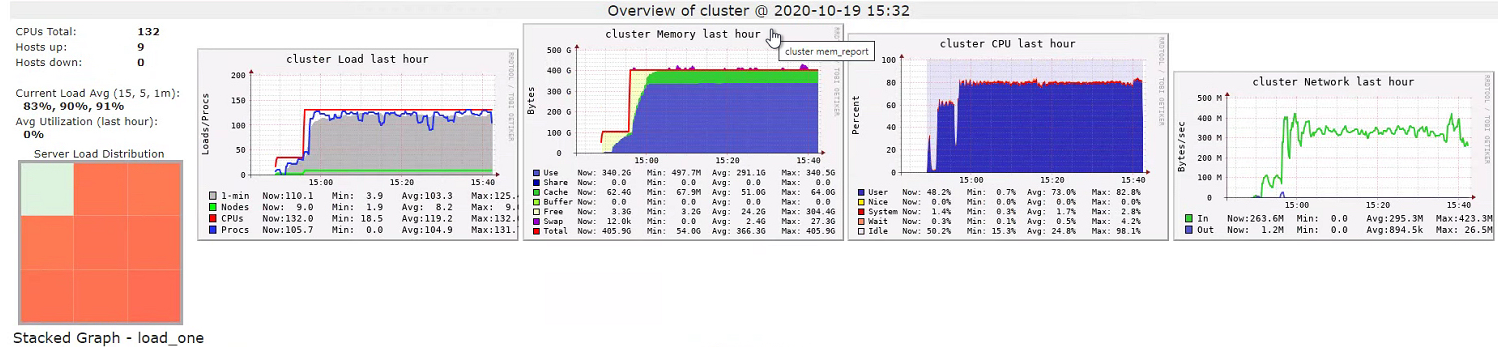
Ganglia Metrics

Ganglia showed that the cluster was running at high capacity although the network usage seemed low. If this is showing the data being pulled from Gen2 into Spark workers, at 300mb/s it would take about an hour to pull it all out of storage. Indeed, this is roughly how long it took. 

However, when I took thread dumps, the executor threads were not waiting on IO. Typically, they were in Spark's CompressibleColumnBuilder (which, according to the docs, "builds optionally compressed byte buffer for a column"). So, it seemed that the cluster really was CPU-bound on parsing the files and garbage collection - which was bad but not horrendous:

Spark GC logs

Calling cache() on the data didn't seem to make queries much faster. Looking at the thread dumps again showed the threads spending a lot of time in CompressibleColumnBuilder for the initial select distinct and in java.io.FileInputStream for the subsequent counts. 

Remembering that  persisting with a storage level of MEMORY_AND_DISK_SER had given me a quick win in the past, I thought I'd try it again but with no success.

I tried enabling the Delta Cache. This is supposed to cache the Gen2 data in the cluster:
Storage Tab

Compare this to the storage tab when we're not using Delta Cache and you'll see there won't be any data in the "Parquet IO Cache". (Note that the page says "RDDs" when we're only using the Dataset API. This is standard). Anyway, enabling Delta Cache seemed to make no difference at all.

Using a "Delta Cache Accelerated" cluster actually made the initial distinct.count() take much longer (1.47 hours) with only marginally reduced time for the next query (16.8 minutes).

Disk is incredibly slow compared to memory. Ultimately, I was trying to process too much data with too little RAM and there's only so far tuning will get you before your metrics plateau. So, I made a cluster of 25 nodes each with 28gb of RAM and 8 cores. This did help but not as much as I was expecting. The distinct.count() now took 38 minutes and the where(...).count() 12 minutes. This is between a 25%-33% improvement but still seems a long time in absolute terms.

I want my Data Locality 

The problem appears to be that all the data is pulled to the executors even if we're only interested in just one column [see StackOverflow]. Evidence for this came from another look at Ganglia:

Ganglia Metrics during second query
This was taken after the distinct.count() and during the where(...).count() query. Note that there is no more network activity, suggesting the first query cached the data.

"In Azure really fast networks compensate for having data and compute separated." [ibid] Indeed, the threads seemed to spend all their time on the first call in code to parse the Parquet rather than blocking on IO. But you can't get over the fact that my two queries are doing much the same thing (no joins) but the first takes three times longer than the second. To demonstrate, instead of two different queries, I ran the distinct.count() query twice. The first time took 42 minutes, the second 15. So, it appears that pulling 1.5TB of data from Gen2 into Spark takes about 25 minutes.

Azure is not the only cloud offering that implements this architectural trick. GCP takes all the data out of storage and puts it into an ephemeral HDFS cluster.

Solution

A new day, a new dawn. Let's start the cluster again and go from the beginning. This time, I won't explicitly enable IO cache and I won't even call .cache() on my DataFrame. To my amazement, the same query ran in about 30 seconds today! It seemed that this .cache() call was the root of my problems as re-introducing it returned us to a 50 minute wait. This is pretty much the opposite of what you'd expect with an on-prem Hadoop/YARN cluster.